

In recent months, we have received many questions from new Pure users about how to log in to Pure and update their research profiles and records. This article offers three quick and simple steps to help you get started.
This guide is relevant if you are a new user, but also works well as a refresher if you have used Pure before.
Who can have a Pure profile?
Because our license numbers are limited, Personal User accounts are only created for staff who meet certain criteria.
If you are on a permanent or fixed-term contract at 0.10 FTE or above and classified as “Teaching and Research”, “Research only” or “Teaching only”, you will have a Personal User account created. You can follow the steps below to get started.
Step 1 – Log in to your Pure
Go to the Pure login page.
You can also access Pure through Staff Essentials under the Quick Links section.
Step 2 – Update your Pure profile
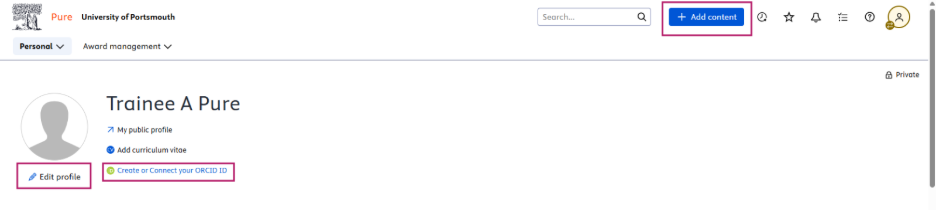
Once you are on your profile page, select “Edit profile” (see image below). A new screen will open. Scroll to the “Profile photos” section to add a profile image (check this guide for the appropriate image size).
Then scroll to “Curriculum and research description” to add your profile information. This guide shows you how to create a good Pure profile and write different sections.
You can also connect Pure to your ORCiD account (see image below). Once connected, Pure will automatically export any new research outputs you add. Please note that importing outputs from ORCiD into Pure is not automatic and needs to be done manually. If you need help with this, you can follow the guidance on how to import outputs from ORCiD.
Step 3 – Start adding content
At the top of your Profile page, you will see a large blue “+ Add content” button (see image above). You can use this to add different types of content such as research outputs, invited talk at events or conferences, peer review activities, press or media coverage. If you need help, guidance is available on how to add different types of content to your profile.
You can also visit our blog for top tips to help your Pure profile shine.
Why Pure Matters
Your profile on the Research Portal helps others find your work. Some academic platforms are not available in every country, but the Research Portal can be viewed almost anywhere without a subscription. This makes it a valuable way to increase your visibility and support new collaborations.
Keeping your profile up to date helps potential partners understand your areas of expertise at a glance.
You can read more about the wider benefits of using pure in our article that shares top tips from a global expert on enhancing your visibility and building your research connections.
Want to Learn More?
Our training session on 18 March will show you how a few simple updates can keep your Pure profile effective with very little effort.
Please register via Docebo.
Need Support?
If you have any questions or need help with Pure, please email pure@port.ac.uk
You can also book a 30-minute one-to-one session with the Pure team.
 Research and Innovation